In my last post I wrote that cloud-run agentic workflows were the next step for me. Since then I’ve built one for my audio plugin hobby project, HØJT.
Lately, I’ve been very interested in the idea of a software factory. Ideas go in one end, released changes come out the other, and agents do most of the work in between. The interesting shift is that the factory itself becomes the thing you work on. It makes it essential to constantly think about process. Process flows that would normally seem naive or overly idealistic — because all the manual steps and handoffs would put far too much cognitive load on developers — become practical when you can model the whole flow and hand it over to agents. While you can still get involved in the code, your main focus shifts to understanding the architecture and design of the solution, what it needs to be properly tested, deployed and informed by user feedback, and making sure the process runs smoothly so you can achieve a much higher output. And the better that process gets, the easier it becomes to transfer that knowledge to other systems — which, in my opinion, might be just about any system.
This post walks through how the factory in hojt-audio is put together: the stations, the feedback loops, how I keep a human in the loop where it matters, and where the setup still struggles. It’s a one-person hobby project where mistakes are cheap, which has made it a great sandbox for testing these ideas before applying them to heavier production systems at work in a later post.
The factory in hojt-audio
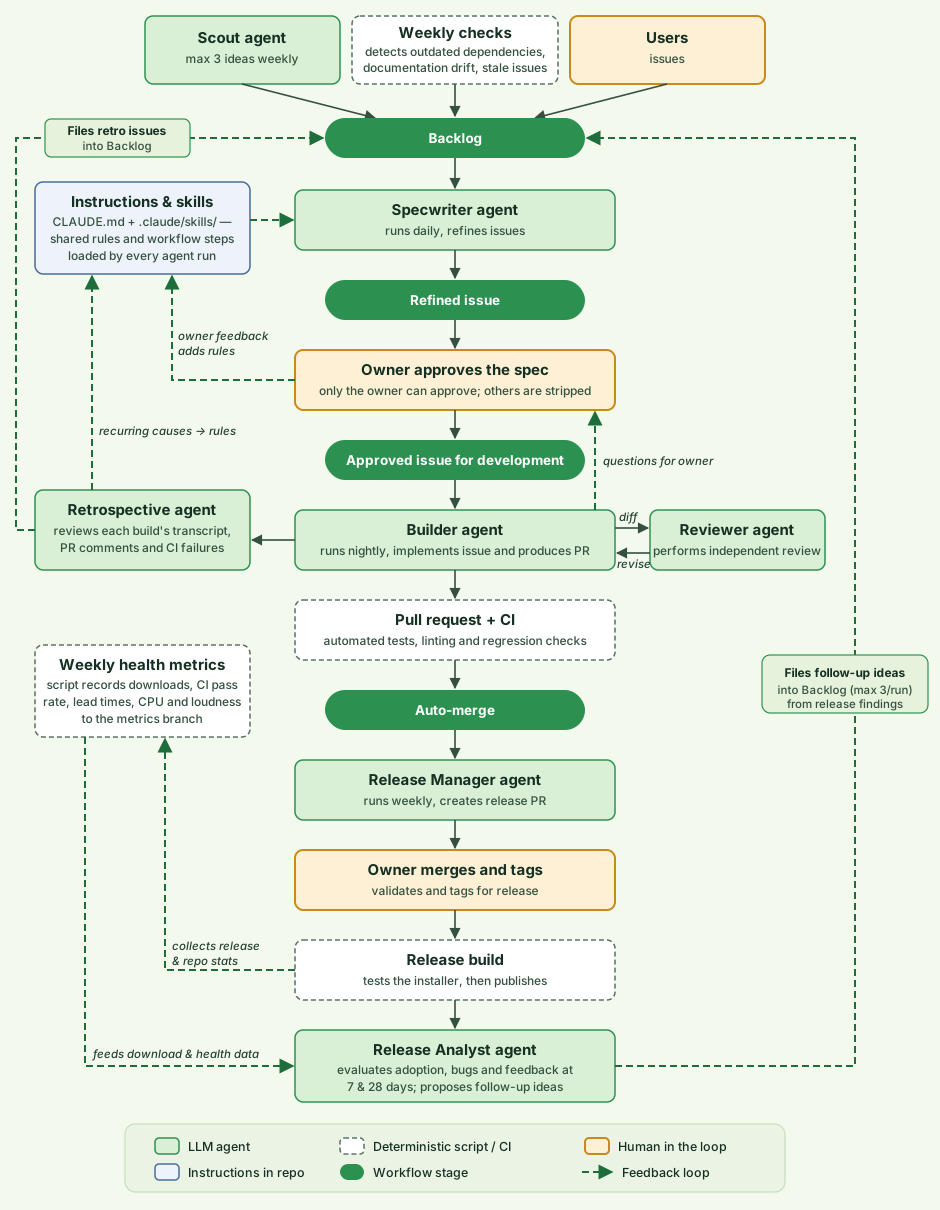
The whole thing runs on plain GitHub and my Claude Code Pro subscription: issues, labels, a project board, Actions and branch protection. The agents are scheduled Claude Code tasks that each run a skill from the repository:
| Stage | Station | What happens |
|---|---|---|
| Intake | Scout agent, weekly checks, users | Weekly market ideas, automated housekeeping findings and user issues enter the backlog |
| Refinement | Specwriter agent | Grooms the backlog daily, interviews outside reporters when details are missing, and writes concrete specs in fresh sessions |
| First gate: Approval | Owner | I review and approve specs on a single pinned issue before any code is written |
| Build | Builder agent | Works through approved issues nightly, each in a fresh session and isolated worktree |
| Review & retro | Reviewer & Retrospective agents | Two fresh sessions score the diff against the spec (seeing only the spec and diff) and inspect the build transcript for friction |
| Merge | Pull request + CI | Cross-platform tests, linting and sound diffs gate an automatic merge |
| Second gate: Release | Release Manager + owner | Prepares the release PR, changelog, audio renders and a manual verification checklist; I validate and tag to publish |
| Post-release | Release Analyst + health script | Reviews downloads, bugs and feedback 7 and 28 days later and files follow-up ideas into the backlog |
The issue tracker is the factory floor
All state lives in GitHub and none of it in a chat session. Any agent session can pick up an issue at any stage by reading its labels, spec and comments. Every handoff is visible, and when something goes wrong, I can read the trail.
Waiting on me is tracked the same way. When a session hits a question or design pick only I can answer, it flags the issue as waiting on me and says what it needs. The issue shows up on my approval list, the Builder skips it, and when I reply on the issue, a workflow clears the flag so the next run continues with my answer. Before that existed, issues quietly stalled in “building” for days.
Turn rules into checks
Audio is hard for an agent to judge, so a lot of the effort went into making the output checkable:
- Sound reports. Deterministic text reports of what a plugin outputs (levels, CPU use) are diffed on every pull request, and audio renders before and after are attached as artifacts.
- Snapshot tests of each editor, so an agent can see what it drew instead of guessing.
- Audio-thread and ID tests that fail if the audio thread allocates memory or if a parameter ID changes and would break users’ saved projects.
- An installer test in the release build that installs, upgrades and uninstalls the Windows installer on the runner before anything is published.
Early on, these were all rules in prose. Rules in prose get skipped when the context window is full, but a failing test can’t be skipped. Whenever I catch myself writing “never do X” in an instruction, I now ask whether it can be a check instead.
Feedback loops
Compiler checks and standard CI/CD are nice, but they aren’t what I mean by a feedback loop in a software factory. In this context, a feedback loop is about finding what makes it hard for the factory to deliver the work and using that signal to improve the agent’s harness: better instructions, missing tools or access, clearer reporting, bug reports and release data, or new deterministic checks.
This is the newest part of the factory, and the one I’d add earliest if I started over. Initially I kept a separate learnings file with dated entries, but I ended up replacing it: a rule belongs in the exact instruction file an agent is already reading when it does the job (CLAUDE.md for rules that hold everywhere, or the relevant skill file for a single process).
There are three ways these signals feed back into the factory:
- The retrospective agent. After every Builder pull request opens, a retrospective runs in a fresh session of its own. It reads the review comments, the CI results, late feedback on recently merged pull requests and the Builder’s session transcript, looking for friction: commands that failed and were retried, missing tools or permissions, files searched for again and again, or a check that would have caught something earlier. It files what it found as a short issue in the backlog. A cause that shows up twice (or once, if it broke a gate or an ID) becomes a rule in the skill or
CLAUDE.md— or, if it’s a mechanical mistake, a deterministic check in the check script. - My feedback. When I say a result was wrong (or right in a way worth keeping), a feedback skill turns it into a single, undated, checkable instruction in the skill step or
CLAUDE.mdsection it governs. Checkable means the next run can tell whether it followed the rule (“a mock-up with overlapping elements is not shown”, not “be more careful”). If the new rule contradicts an older one, it replaces it. The concrete case and the date stay in the pull request and on the issue, not in the instructions. - Post-release reporting. A weekly health script records download counts, CI pass rates, lead times, CPU usage and audio loudness to a dedicated metrics branch, and the Release Analyst combines that data with bug reports and user feedback 7 and 28 days after each release to file follow-up work back into the backlog.
Because the instructions, skills and check scripts live in the repository, every improvement to the harness goes through a pull request like everything else, so I can see what the factory is teaching itself.
Security: least privilege and humans in the loop
I design the factory as if every agent were a well-meaning contractor who reads untrusted input all day. They work fast, mostly do the right thing, and can be manipulated by text they read. That leads to a few principles.
Least privilege per station
Each workflow gets only the permissions its job needs. The weekly checks workflow can read the repository and write issues, nothing else. The approval-guard and question-handling workflows can only write issues. The health workflow writes to its own metrics branch and never touches the main branch. And the main branch is protected for admins too, so every change goes through a pull request and required CI checks.
Put human gates where the risk is
Requiring a human at every step turns the human into the bottleneck again. In hojt-audio there are exactly two human gates: approving the intent (the spec) and validating and tagging the release. The Release Manager does all the preparation, but the pull request it opens has auto-merge turned off, and only a tag I push publishes anything. Everything between those two gates is automated and verified by checks.
Make the gate hard to rubber-stamp
A gate is only worth something if the human actually looks. That’s why every automated station has a cap on how much it can queue up — the Specwriter pauses while five specs wait for my approval, because a queue of five gets read while a queue of fifty gets approved in bulk. It’s also why the Release Manager hands me a checklist of what it couldn’t verify in the cloud instead of ticking it off itself. I’ll admit the “Approve all” button on my approval list is a temptation I have to be careful with.
Where the factory still struggles
Running this on an audio plugin suite has also made the current limits very clear.
The environment gap and local testing
Because the repository is public, I’m lucky to have free access to GitHub-hosted runners on Windows, macOS and Linux. Even so, cloud runners can’t test everything. I haven’t set up local test machines for macOS and Linux, and on Windows there are still things that require real audio hardware, a real display or a human ear. Almost every day I check in and find issues waiting on me to test something locally or listen to the rendered output of a plugin — which also tests the limits of my ability to describe sound in a way an LLM can actually work with. I can let Claude take control of my machine and run a lot of that testing, but doing it properly has turned out to be quite time-consuming.
UI and visual design
UI and visual design have been much harder than I expected. I’ve tried different design skills across both Claude and Antigravity to see how far I could push the styling of the plugins and the app. The UI is functional at the very least and fits my current needs, though I wouldn’t say I’m super happy with it and I’m still looking for better ways to improve the design. Even getting to this point took far more effort than anticipated, and I’ve been surprised by how poor the models’ visual judgement can be. Even when given several passes to render and critique their own designs, they still leave obvious visual flaws behind. That has been a bit puzzling to reconcile with interviews from technical staff at labs like Anthropic saying you just need to demand more of newer models and hand them bigger goals. On the coding side, that has very much been my experience — on UI design, not so much.
Knowing when to step in manually
Some problems still need manual intervention — or a better model. The pitch shifter is a good example. After several iterations on the DSP engine using Opus 5.5, I still wasn’t happy with how it handled chords and sustained notes. When Fable 5.2 was released, I stepped in and had the pitch shifter engine redone from scratch with it. That produced a much better result, even though stepping in like that isn’t something I’d normally want to do once the factory is running.