Guitar Amp
GA-3 / Effect / mono or stereo in, stereo out
What it is
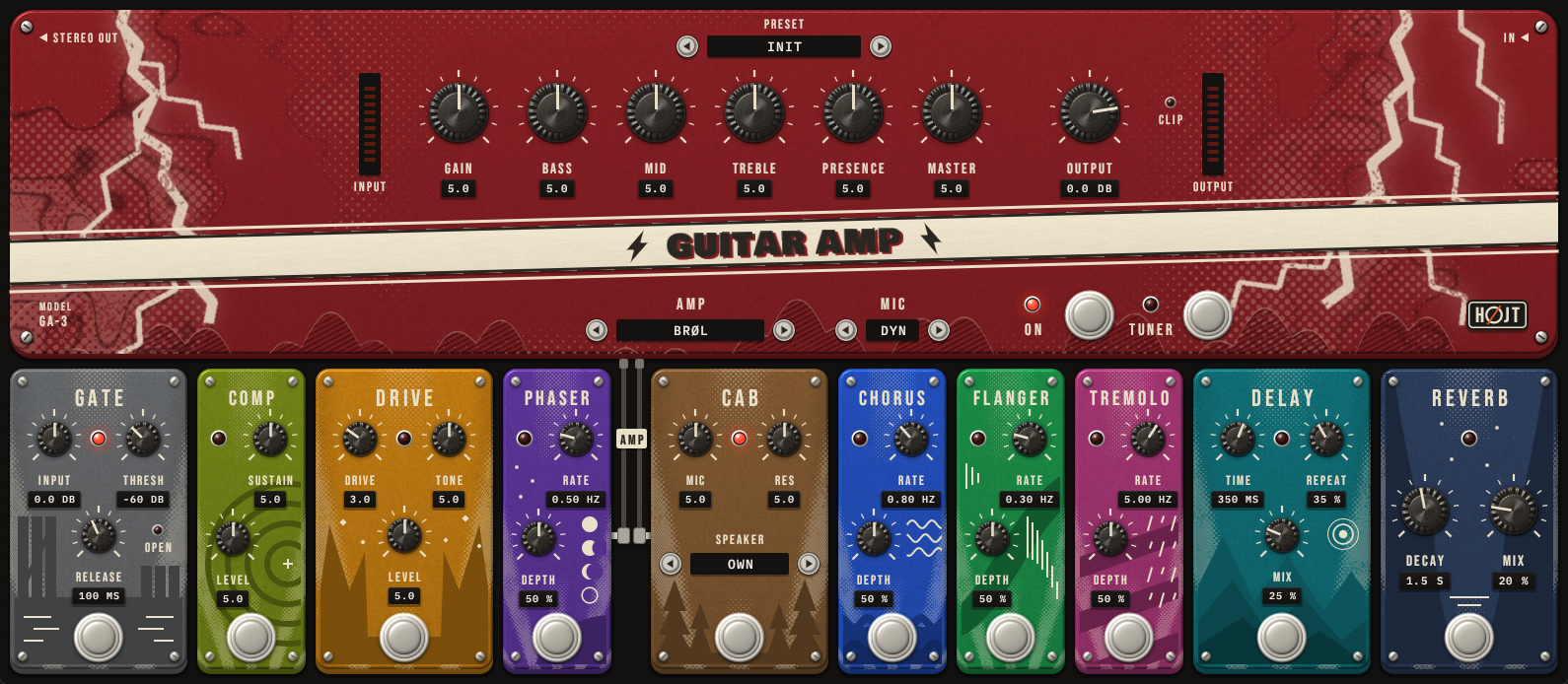
A whole guitar rig in one window: four amps, each with its own cabinet, and ten pedals around them. Plug a guitar straight into the audio interface and play.
- Klar is clean and glassy, Brøl a mid-forward crunch, Torden a tight modern high gain, Glød warm and chiming at the edge of breakup. Each remembers its own six dials
- Gate, compressor, overdrive, phaser, chorus, flanger, tremolo, cabinet, delay and reverb. Drag a pedal by its name to move it in the chain
- Hear the cabinet through a dynamic, ribbon or condenser microphone, or play through
your own cabinet impulse responses: drop WAV files in
Documents/Hojt Audio/Cabinets - Twenty presets, a tuner, and meters for the level going in and coming out
- 0.1 to 0.3 ms of latency, so it can be played live
Everything is our own design. It does not copy any real amp or pedal.
Download
The macOS and Linux builds have not been tried in a DAW yet. How to install
Listen
- Guitar, straight in
- Klar, clean
- Brøl, crunch
- Glød, edge of breakup
- Torden, high gain
- Torden, lead with delay
- Preset Tåge: clean, long delay and reverb
The guitar in these clips is made by a program, not played, so the amp is all you hear change.
Controls
| Control | Range | What it does |
|---|---|---|
| On | on / off | Bypasses the whole rig, without a click |
| Tuner | on / off | Silent tuning, 48 Hz to 1420 Hz against A = 440 Hz |
| Input | -24 to +24 dB | Brings the guitar to the level the amps expect |
| Amp | Klar / Brøl / Torden / Glød | The amp and its cabinet |
| Gain, Bass, Mid, Treble, Presence, Master | 0.0 to 10.0 | The amp's six dials |
| Output | -30 to +6 dB | Output level. A lamp shows when it clips; meters show the level going in and coming out |
| Gate: Threshold, Release | -80 to -20 dB, 20 to 500 ms | Noise gate on the input. A lamp shows when it is open |
| Comp: Sustain, Level | 0.0 to 10.0 | Compressor. Level 5 is as loud as the pedal off |
| Drive: Gain, Tone, Level | 0.0 to 10.0 | Overdrive in front of the amp |
| Phaser, Chorus, Flanger, Tremolo: Rate, Depth | 0.05 to 12 Hz, 0 to 100 % | Modulation, in front of the amp or behind the cabinet |
| Cab: Mic, Resonance | 0.0 to 10.0 | Darker to brighter microphone position; less or more low thump. Steps through your own cabinet files |
| Mic type | Dynamic / Ribbon / Condenser | Which microphone hears the cabinet: as designed, warm and dark, or open on top |
| Delay: Time, Feedback, Mix | 20 to 1000 ms, 0 to 90 %, 0 to 100 % | Stereo delay |
| Reverb: Decay, Mix | 0.3 to 6.0 s, 0 to 100 % | Stereo reverb |
Drum Synth
DS-2 / Instrument / MIDI in, stereo out, six stereo stems
What it is
A full drum kit with no samples. Every hit is made in the plugin as it is played, so there is nothing to install or to go missing, and no two hits are quite the same.
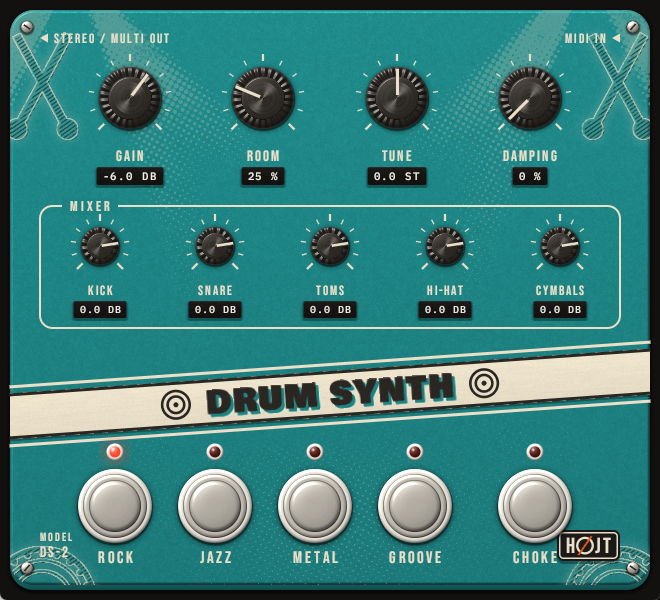
- Four kits: Rock, Jazz, Metal and Groove, each with its own room
- Kick, snare, side stick, six toms, hi-hat, two crashes, ride and bell, china, splash, and a shaker on Groove
- General MIDI drum map: works with any drum pattern or e-kit. The hi-hat follows an e-kit's pedal, and with Choke on a cymbal can be grabbed
- Six extra stereo outputs (kick, snare, hi-hat, toms, cymbals, room) for mixing the kit on tracks of its own
- Playing harder changes the sound, not only the level
Listen
- Rock kit
- Jazz kit
- Metal kit
- Groove kit
Download
The macOS and Linux builds have not been tried in a DAW yet. How to install
Controls and MIDI notes
| Control | Range | What it does |
|---|---|---|
| Kit | Rock / Jazz / Metal / Groove | The sound of every piece and of the room |
| Gain | -30 to +6 dB | Output level |
| Room | 0 to 100 % | Amount of room reverb |
| Tune | -6 to +6 st | Pitch of kick, snare and toms |
| Damping | 0 to 100 % | Shortens the ring of drums and cymbals |
| Kick, Snare, Toms, Hi-Hat, Cymbals | -30 to +6 dB | Level of each group |
| Choke | on / off | A note-off on a cymbal damps it at once, as a hand does |
| MIDI note | Plays | MIDI note | Plays |
|---|---|---|---|
| 35, 36 | Kick | 42 / 44 / 46 | Hi-hat closed / pedal / open |
| 38, 40 | Snare | 49, 57 | Crash 1, Crash 2 |
| 37 | Side stick | 51, 59 / 53 | Ride / Ride bell |
| 41, 43, 45, 47, 48, 50 | Toms, low to high | 52, 55 | China, Splash |
| CC4 | Hi-hat pedal: how open 46 is | 69, 70, 82 | Shaker (Groove) |
Pitch Shifter
PS-10 / Effect / in, out
What it is
Tune the guitar down without touching the pegs, or up like a capo. It shifts by up to an octave either way and is made to be played through live.
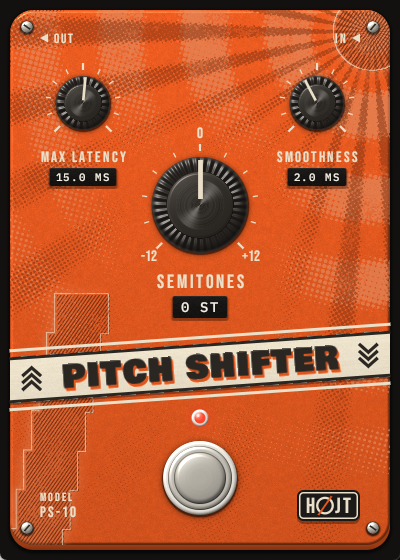
- -12 to +12 semitones
- The delay follows the note you play: about 12 ms on the low E string, under 3 ms high up the neck
- At 0 semitones the signal passes through untouched, to the bit
- Single notes are cleanest. For chords, turn Max Latency up to 25 or 30 ms
Listen
- Notes, as played
- Notes, 2 semitones down
- Notes, 7 semitones up
- Chords, as played
- Chords, 2 semitones down
Download
The macOS and Linux builds have not been tried in a DAW yet. How to install
Controls
| Control | Range | What it does |
|---|---|---|
| Semitones | -12 to +12 | How far to shift |
| Max Latency | 2 to 50 ms | The longest the delay may get. Low E needs 12 ms, chords are cleaner at 25 to 30 ms |
| Smoothness | 0.5 to 10 ms | Length of the crossfade where the sound is joined |
| Bypass | on / off | The footswitch. Switches without a click |
Bass Synth
BA-1 / Instrument / MIDI in, out
What it is
A plucked string bass, one note at a time, made in the plugin as it is played. Two voices share the string: one picked, one played with a finger.
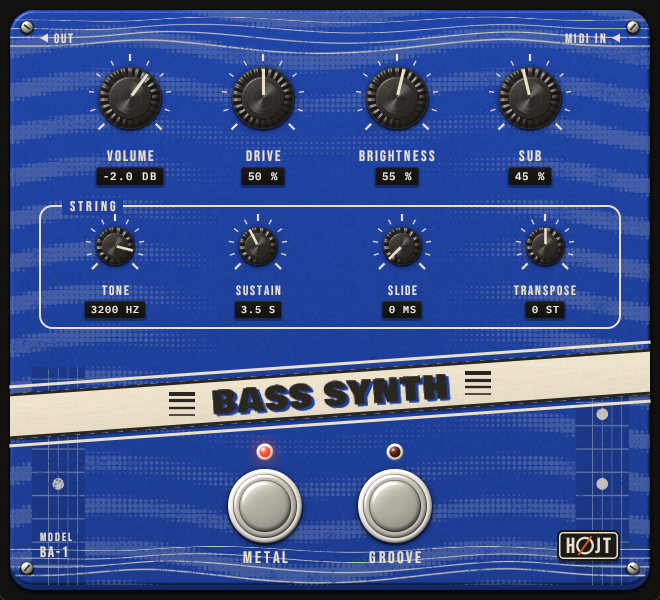
- Metal is picked: clean lows under a distorted band of mids
- Groove is played with a finger: warm, with a little drive, and it slides between notes that overlap
- Picking a voice sets the knobs to that voice's own sound, like a preset
- Letting go of a key damps the string
Listen
- Metal, picked
- Groove, finger
Download
The macOS and Linux builds have not been tried in a DAW yet. How to install
Controls
| Control | Range | What it does |
|---|---|---|
| Metal, Groove | on / off | The two footswitches: which voice plays |
| Volume | -30 to +12 dB | Output level |
| Drive | 0 to 100 % | Distortion of the mids (Metal), tube drive (Groove) |
| Brightness | 0 to 100 % | How hard the string is plucked and how long its top rings |
| Sub | 0 to 100 % | Level of a sine under the string |
| String: Tone | 300 to 4000 Hz | How dark or bright |
| String: Sustain | 0.5 to 8 s | How long a held note rings |
| String: Slide | 0 to 300 ms | Glide between notes that overlap; 0 plucks every note |
| String: Transpose | -24 to +24 st | Moves every note up or down |
Shimmer Pad
SP-1 / Instrument / MIDI in, stereo out
What it is
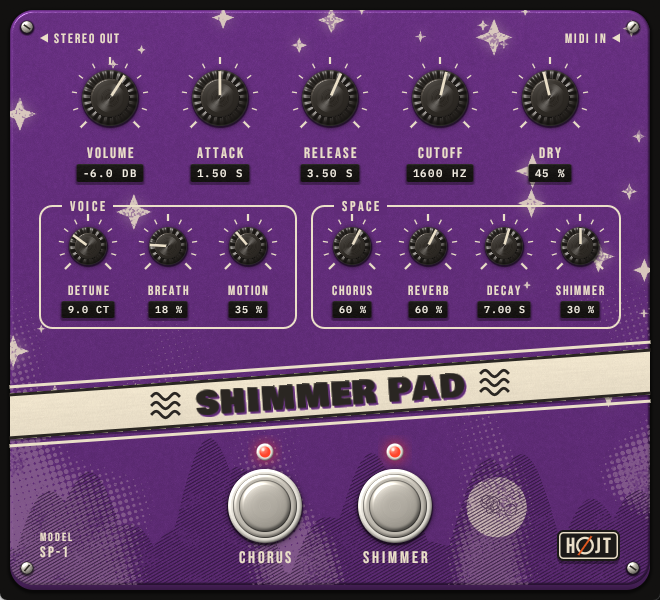
A slow ambient pad for long chords far behind a mix. Each note swells in, drifts, and fades into a large hall that comes back an octave up.
- Twelve voices of detuned saws and breath, with filters that wander
- A chorus and a hall built in, each on a footswitch
- Shimmer: the hall's tail is played back an octave up and fed into the hall again
Listen
- Shimmer Pad
Download
The macOS and Linux builds have not been tried in a DAW yet. How to install
Controls
| Control | Range | What it does |
|---|---|---|
| Volume | -40 to +12 dB | Output level |
| Attack | 0.01 to 6 s | Time to swell to full level |
| Release | 0.05 to 10 s | How long a note fades once the key is let go |
| Cutoff | 150 to 8000 Hz | How dark or bright once swelled |
| Dry | 0 to 100 % | Level of the pad itself, beside the effects |
| Voice: Detune, Breath, Motion | 0 to 30 ct, 0 to 100 %, 0 to 100 % | Width of the saws, noise in each voice, how far the filters wander |
| Space: Chorus, Reverb | 0 to 100 % | Depth of the chorus, level of the hall |
| Space: Decay | 1 to 20 s | How long the hall rings |
| Space: Shimmer | 0 to 60 % | How much of the tail comes back an octave up |
| Chorus, Shimmer | on / off | The footswitches. Off fades the effect out |
Glass Bells
GB-1 / Instrument / MIDI in, stereo out
What it is
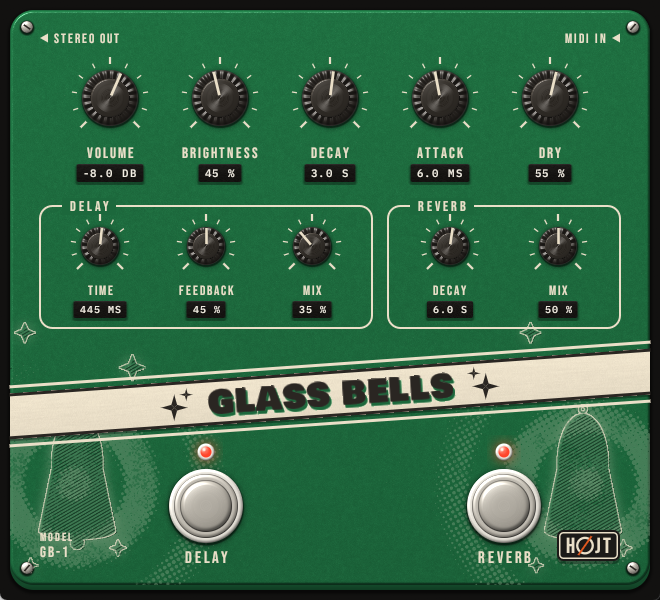
Soft glassy bells for sparse lines far behind a mix, with a ping-pong delay and a hall built in. A bell rings out by itself, so how long a key is held does not matter.
- Twelve voices; lower bells ring longer
- Every note has its own place between the speakers, and the echoes bounce from side to side
- Brightness and how hard a key is struck set how much glass is in the strike
Listen
- Glass Bells
Download
The macOS and Linux builds have not been tried in a DAW yet. How to install
Controls
| Control | Range | What it does |
|---|---|---|
| Volume | -40 to +12 dB | Output level |
| Brightness | 0 to 100 % | Glass in the strike |
| Decay | 0.3 to 10 s | How long a bell rings |
| Attack | 0.5 to 50 ms | How softly the strike fades in |
| Dry | 0 to 100 % | Level of the bells themselves, beside the effects |
| Delay: Time, Feedback, Mix | 50 to 1500 ms, 0 to 90 %, 0 to 100 % | Ping-pong delay |
| Reverb: Decay, Mix | 0.5 to 20 s, 0 to 100 % | Hall |
| Delay, Reverb | on / off | The footswitches |
Install
- Download the zip for your system and unpack it.
- Copy one of the two plugin files to its folder below:
.vst3for most DAWs (Reaper, Ableton Live, Cubase, FL Studio, Studio One), or.clapwhere the DAW supports it (Reaper, Bitwig, FL Studio, Studio One). Create the folder if it is not there. - Let the DAW scan for plugins. They are listed under Hojt Audio.
| System | VST3 | CLAP |
|---|---|---|
| Windows | C:\Program Files\Common Files\VST3 | C:\Program Files\Common Files\CLAP |
| macOS | ~/Library/Audio/Plug-Ins/VST3 | ~/Library/Audio/Plug-Ins/CLAP |
| Linux | ~/.vst3 | ~/.clap |
macOS: one more step
macOS stops plugins that were downloaded and do not come from a registered developer. After copying, open Terminal and run this once for each plugin you installed, with the name of the file you copied:
xattr -dr com.apple.quarantine ~/Library/Audio/Plug-Ins/VST3/HojtGuitarAmp.vst3
Updating
Copy the new file over the old one. Projects that use the plugin open with their settings as they were.
Something wrong?
Tell us which plugin, system and DAW in an issue on GitHub. The macOS and Linux builds come straight from the build server and have not been tried in a DAW yet, so reports from there are especially welcome.
A sound you miss?
Say what you would like to hear, or what sounds off, in a sound wish, or suggest something new. Every one is read.