
Guitar Amp
GA-3 / Effect / mono or stereo in, stereo out
What it is
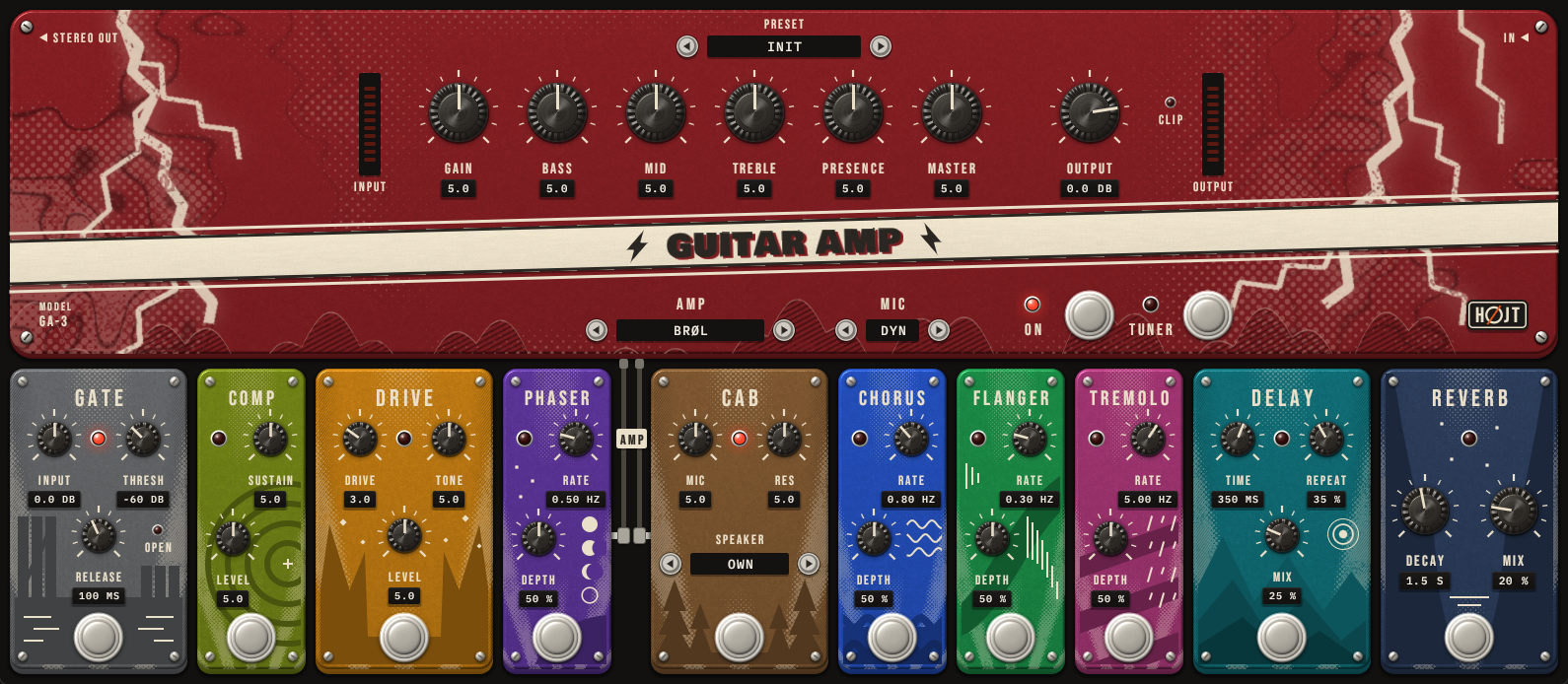
A guitar amp and a pedal board in one plugin. Twelve amps, each with its own cabinet, and thirteen pedals you can put in any order. Plug your guitar into your audio interface and play.
- Clear is clean and glassy, Roar a mid-forward crunch, Thunder a tight modern high gain, Glow warm and chiming at the edge of breakup, Song a smooth singing lead and Rumble big, loose and dark. Crack is a thick, warm mid-gain rock amp and Spark its bright, chimey cousin; Sharp is a crisp, tight modern high gain and Edge a dense, hot-rodded one. Wood makes an electric guitar sound acoustic and Snap is a clean amp with a snap. Each remembers its own six dials. Run two amps at once if one feels lonely: switch on a second amp, with its own cabinet, and Blend between the two
- Gate, wah, fuzz, pitch, compressor, overdrive, phaser, chorus, flanger, tremolo, EQ, delay and reverb. Drag a pedal by its name to move it in the chain. The delay can follow the song's tempo
- Add and take out effects on the line itself: move the pointer into a gap and click the plus, and a bank of effects rises from the bottom of the window. A preset keeps the whole chain
- A looper: record a phrase, close the loop and play over it, overdub more, mute it or clear it. It is not saved with a project
- A wah with a tall rocker: slide it from heel to toe by hand, or map an expression pedal to it in your DAW. In Auto the playing sweeps it, a harder pick opening it further
- Fourteen built-in cabinets to play any amp through. Hear the cabinet through one of five
microphones, or play through your own cabinet impulse responses: drop WAV files in
Documents/Hojt Audio/Cabinets - Thirty-nine factory presets in banks, and your own: Save names a preset and keeps
it in
Documents/Hojt Audio/Presets - A tuner, a metronome for practice, and meters for the level going in and coming out
- As a program of its own, an Audio button picks the interface, the buffer and the sample rate
- 0.1 to 0.3 ms of latency, so it can be played live
Everything is our own design. It does not copy any real amp or pedal.
Download
The twelve amps
| Amp | Its character |
|---|---|
| Clear | Clean and glassy. Stays clean until you dig in hard; a good start for chords and bright single notes |
| Roar | A mid-forward crunch: the sound of a classic rock rhythm guitar |
| Thunder | Tight, modern high gain. The low end stays firm and the notes stay clear, so fast riffs do not turn to mush |
| Glow | Warm and chiming, right at the edge of breakup. Between Clear and Roar: clean when you play softly, a little grit when you dig in |
| Song | A smooth, compressed singing lead. Notes sustain and blend into each other |
| Rumble | Big, loose and dark, with the low end let through. Heavy and roomy rather than tight |
| Crack | Thick, warm, slightly woolly mid-gain rock. Breaks up from Gain 4 and goes fuzzy-warm past 6, sagging a little under hard playing |
| Spark | Crack's bright, chimey cousin. Sparkles even at low Gain |
| Sharp | Crisp, tight modern high gain with a firm low end, thick saturation and a clear bite around 3 kHz |
| Edge | Dense, mid-heavy, hot-rodded high gain with a looser low end. The pick attack stays in the sound |
| Wood | Makes an electric guitar sound like an acoustic one. In place of a speaker cabinet it has the body of a guitar, and nothing in it distorts, so two notes held together stay two notes. Keep Gain under 7.5 for strummed chords |
| Snap | A clean amp with a snap: bright, tight and quick, for single coils and chords where every string should be heard. It stays clean all the way up the Gain dial and keeps the low end short, so nothing booms under a chord |
Controls
| Control | Range | What it does |
|---|---|---|
| On | on / off | Bypasses the whole rig, without a click |
| Metronome: Metro, Tempo, Meter, Sound, Volume | on / off, 40 to 300 bpm, 2/4 to 6/8, -60 to 0 dB | A click on top of the finished sound. Sync follows the DAW. Click out can send it to its own output |
| Tuner | on / off | Silent tuning, 48 Hz to 1420 Hz against A = 440 Hz |
| Input | -24 to +24 dB | Brings the guitar to the level the amps expect |
| Amp | Clear / Roar / Thunder / Glow / Song / Rumble / Crack / Spark / Sharp / Edge / Wood / Snap | The amp and its cabinet |
| Amp 2, Amp 2 Model, its six dials | on / off, 0.0 to 10.0 | A second amp through its own cabinet. Off, the sound is the first amp alone |
| Amp Blend | 0.0 to 10.0 | 0 is the first amp alone, 10 the second alone |
| Gain, Bass, Mid, Treble, Presence, Master | 0.0 to 10.0 | The amp's six dials |
| Output | -30 to +6 dB | Output level. A lamp shows when it clips; meters show the level going in and coming out |
| Gate: Threshold, Release | -80 to -20 dB, 20 to 500 ms | Noise gate on the input. A lamp shows when it is open |
| Comp: Sustain, Level | 0.0 to 10.0 | Compressor. Level 5 is as loud as the pedal off |
| Fuzz: Fuzz, Tone | 0.0 to 10.0 | Thick fuzz in front of the amp, about as loud as switched off |
| Pitch: Semitones, Blend, Tracking | -12 to +12 st, 0 to 100 %, 2 to 50 ms | Shifts the guitar for drop tunings or a harmony. Adds a few milliseconds of latency while it is on |
| Wah, Wah Pedal, Wah Bite, Wah Mode, Wah Sens | on / off, 0.0 to 10.0, 0.0 to 10.0, Pedal / Auto, 0.0 to 10.0 | A resonant filter in front of the amp. The rocker sweeps from 350 Hz (heel, woofy) to 2.2 kHz (toe, thin and vocal); Bite narrows the peak. In Auto the playing opens it from where the rocker rests, as far as Sens says. In Reaper, to use an expression pedal: click Param on the plugin, choose Wah Pedal, pick Link from MIDI or OSC, move the pedal, and it sweeps the rocker |
| Drive: Gain, Tone, Level | 0.0 to 10.0 | Overdrive in front of the amp |
| Phaser, Chorus, Flanger, Tremolo: Rate, Depth | 0.05 to 12 Hz, 0 to 100 % | Modulation, in front of the amp or behind the cabinet |
| Cab: Mic, Resonance | 0.0 to 10.0 | Darker to brighter microphone position; less or more low thump. Steps through your own cabinet files |
| Mic type | Dynamic / Ribbon / Condenser / Close / Air | Which microphone hears the cabinet: as designed, warm and dark, open on top, dark and close, or bright and thin |
| EQ: Low, Mid, High, Freq | ±12 dB (5 is flat), 200 Hz to 5 kHz | Low and high shelves at 100 Hz and 4 kHz and a sweepable mid. Off and flat it changes nothing |
| Delay: Time, Feedback, Mix | 20 to 1000 ms, 0 to 90 %, 0 to 100 % | Stereo delay |
| Delay: Sync | on / off | Time picks a note instead: 1/4, 1/8 dotted, 1/8, 1/8 triplet or 1/16, in step with the song |
| Reverb: Decay, Mix | 0.3 to 6.0 s, 0 to 100 % | Stereo reverb |
Drum Synth
DS-2 / Instrument / MIDI in, stereo out, six stereo stems
What it is
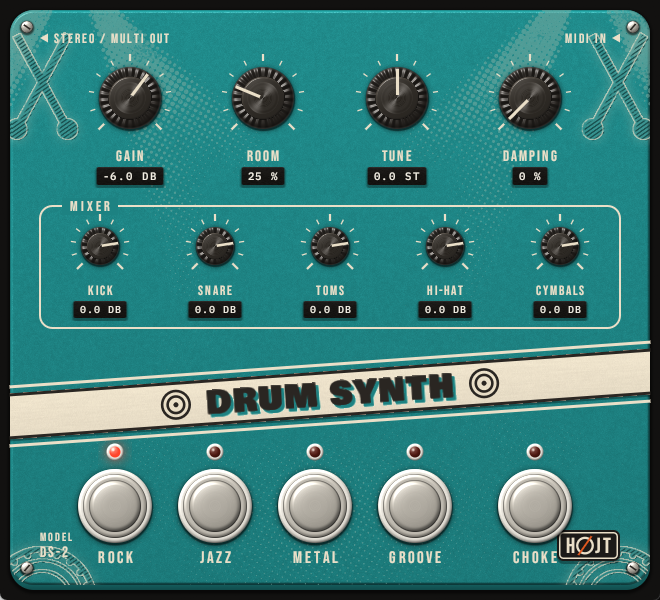
A full drum kit with no samples. Every hit is made in the plugin as it is played, so there is nothing to install or to go missing, and no two hits are quite the same.
- Four kits: Rock, Jazz, Metal and Groove, each with its own room
- Kick, snare, side stick, six toms, hi-hat, two crashes, ride and bell, china, splash, and a shaker on Groove
- General MIDI drum map: works with any drum pattern or e-kit. The hi-hat follows an e-kit's pedal, and with Choke on a cymbal can be grabbed
- Six extra stereo outputs (kick, snare, hi-hat, toms, cymbals, room) for mixing the kit on tracks of its own
- Playing harder changes the sound, not only the level
Download
Controls and MIDI notes
| Control | Range | What it does |
|---|---|---|
| Kit | Rock / Jazz / Metal / Groove | The sound of every piece and of the room |
| Gain | -30 to +6 dB | Output level |
| Room | 0 to 100 % | Amount of room reverb |
| Tune | -6 to +6 st | Pitch of kick, snare and toms |
| Damping | 0 to 100 % | Shortens the ring of drums and cymbals |
| Kick, Snare, Toms, Hi-Hat, Cymbals | -30 to +6 dB | Level of each group |
| Human | 0 to 100 % | Makes every hit a little louder or softer and a little late, so a beat drawn on a grid sounds played. 0 is exactly as drawn |
| Choke | on / off | A note-off on a cymbal damps it at once, as a hand does |
| MIDI note | Plays | MIDI note | Plays |
|---|---|---|---|
| 35, 36 | Kick | 42 / 44 / 46 | Hi-hat closed / pedal / open |
| 38, 40 | Snare | 49, 57 | Crash 1, Crash 2 |
| 37 | Side stick | 51, 59 / 53 | Ride / Ride bell |
| 41, 43, 45, 47, 48, 50 | Toms, low to high | 52, 55 | China, Splash |
| CC4 | Hi-hat pedal: how open 46 is | 69, 70, 82 | Shaker (Groove) |
Pitch Shifter
PS-10 / Effect / in, out
What it is
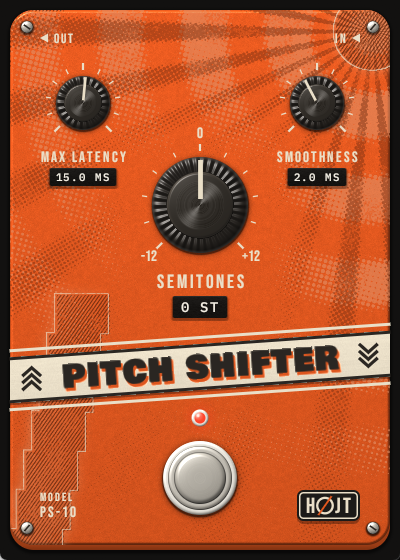
Tune the guitar down without touching the pegs, or up like a capo. It shifts by up to an octave either way and is made to be played through live.
- -12 to +12 semitones
- A fixed delay of 5, 11, 21 or 43 ms, the longest that fits under Max Latency: 11 ms at the default, whatever note you play
- Chords come out as chords and long notes ring on without turning robotic
- At 0 semitones the signal passes through untouched, to the bit
Listen
- First riff, as played
- First riff, shifted down
- Second riff, as played
- Second riff, shifted down
Download
Controls
| Control | Range | What it does |
|---|---|---|
| Semitones | -12 to +12 | How far to shift |
| Max Latency | 2 to 50 ms | The delay: 5, 11, 21 or 43 ms, the longest that fits. Longer is a little cleaner on single notes |
| Smoothness | 0.5 to 10 ms | Length of the crossfade when the shift is switched on or off |
| Bypass | on / off | The footswitch. Switches without a click |
Bass Synth
BA-1 / Instrument / MIDI in, out
What it is
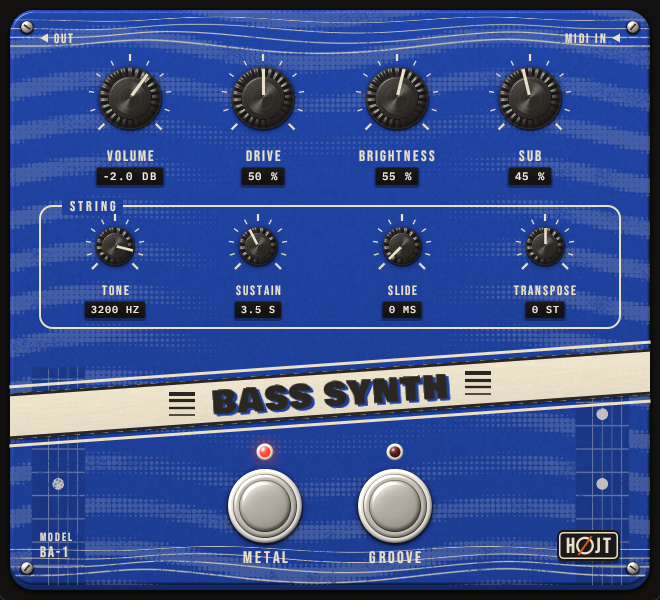
A plucked string bass, one note at a time, made in the plugin as it is played. Two voices share the string: one picked, one played with a finger.
- Metal is picked: clean lows under a distorted band of mids
- Groove is played with a finger: warm, with a little drive, and it slides between notes that overlap
- Picking a voice sets the knobs to that voice's own sound, like a preset
- Letting go of a key damps the string
Download
Controls
| Control | Range | What it does |
|---|---|---|
| Metal, Groove | on / off | The two footswitches: which voice plays |
| Volume | -30 to +12 dB | Output level |
| Drive | 0 to 100 % | Distortion of the mids (Metal), tube drive (Groove) |
| Brightness | 0 to 100 % | How hard the string is plucked and how long its top rings |
| Sub | 0 to 100 % | Level of a sine under the string |
| String: Tone | 300 to 4000 Hz | How dark or bright |
| String: Sustain | 0.5 to 8 s | How long a held note rings |
| String: Slide | 0 to 300 ms | Glide between notes that overlap; 0 plucks every note |
| String: Bend | 1 to 12 st | How far the pitch-bend wheel goes at its end, up and down |
| String: Transpose | -24 to +24 st | Moves every note up or down |
Shimmer Pad
SP-1 / Instrument / MIDI in, stereo out
What it is
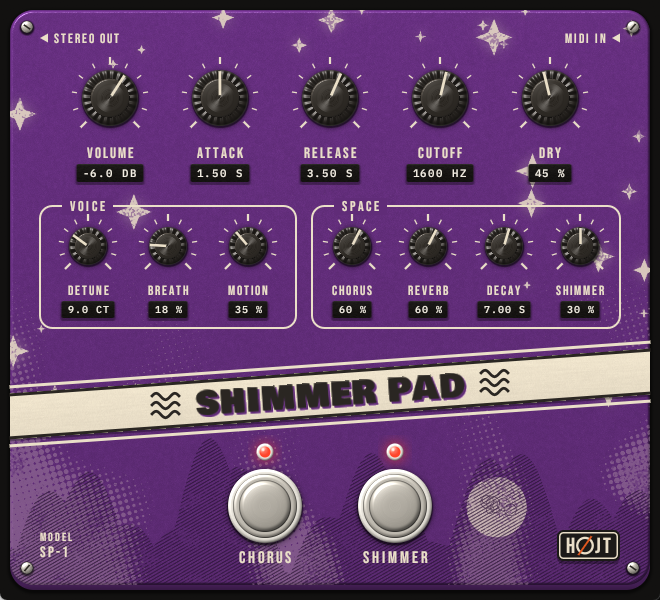
A slow ambient pad for long chords far behind a mix. Each note swells in, drifts, and fades into a large hall that comes back an octave up.
- Twelve voices of detuned saws and breath, with filters that wander
- A chorus and a hall built in, each on a footswitch
- A sustain pedal (MIDI CC 64) or the Hold switch keeps released keys sounding; the mod wheel opens the filter and lifts the shimmer
- Shimmer: the hall's tail is played back an octave up and fed into the hall again
Download
Controls
| Control | Range | What it does |
|---|---|---|
| Volume | -40 to +12 dB | Output level |
| Attack | 0.01 to 6 s | Time to swell to full level |
| Release | 0.05 to 10 s | How long a note fades once the key is let go |
| Cutoff | 150 to 8000 Hz | How dark or bright once swelled |
| Dry | 0 to 100 % | Level of the pad itself, beside the effects |
| Voice: Detune, Breath, Motion | 0 to 30 ct, 0 to 100 %, 0 to 100 % | Width of the saws, noise in each voice, how far the filters wander |
| Space: Chorus, Reverb | 0 to 100 % | Depth of the chorus, level of the hall |
| Space: Decay | 1 to 20 s | How long the hall rings |
| Space: Shimmer | 0 to 60 % | How much of the tail comes back an octave up |
| Chorus, Shimmer | on / off | The footswitches. Off fades the effect out |
| Hold | on / off | Keeps released keys sounding, like a sustain pedal; CC 64 does the same |
Glass Bells
GB-1 / Instrument / MIDI in, stereo out
What it is
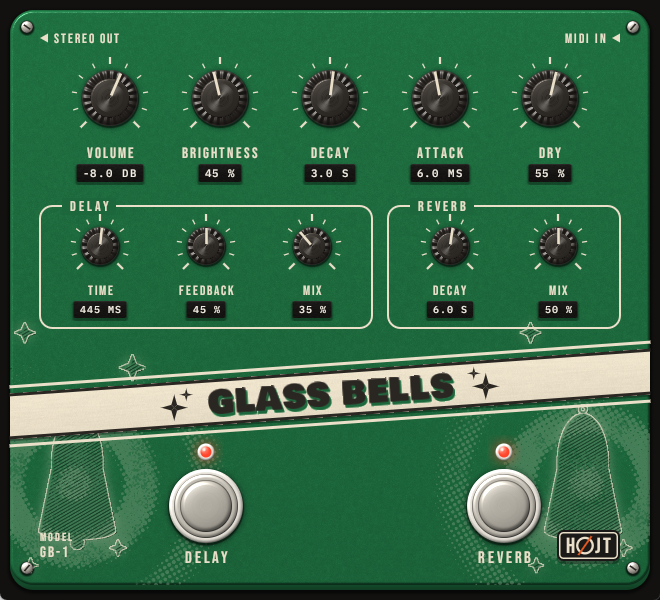
Soft glassy bells for sparse lines far behind a mix, with a ping-pong delay and a hall built in. A bell rings out by itself, so how long a key is held does not matter.
- Twelve voices; lower bells ring longer
- Every note has its own place between the speakers, and the echoes bounce from side to side
- Brightness and how hard a key is struck set how much glass is in the strike; the mod wheel (CC 1) raises Brightness while you play
Download
Controls
| Control | Range | What it does |
|---|---|---|
| Volume | -40 to +12 dB | Output level |
| Brightness | 0 to 100 % | Glass in the strike |
| Decay | 0.3 to 10 s | How long a bell rings |
| Attack | 0.5 to 50 ms | How softly the strike fades in |
| Dry | 0 to 100 % | Level of the bells themselves, beside the effects |
| Delay: Time, Feedback, Mix | 50 to 1500 ms, 0 to 90 %, 0 to 100 % | Ping-pong delay |
| Reverb: Decay, Mix | 0.5 to 20 s, 0 to 100 % | Hall |
| Delay, Reverb | on / off | The footswitches |
Download and install
The plugins were first called HØJT. Their names inside your DAW and the .vst3 and
.clap file names still start with Hojt, and the DAW lists them under
Hojt Audio, so that projects you saved keep finding them.
Windows: one installer
One setup puts every plugin in place. You tick which plugins you want, and VST3, CLAP or both. It can also add each plugin as a program of its own, to play without a DAW: it gets an entry in the Start menu folder HØJT DSP. They play through WASAPI or, for a low delay, through your interface's ASIO driver.
Download for WindowsHojtDSP-Setup.exe, 64-bit
- Close your DAW. If it is still open, the installer asks to close it.
- Run
HojtDSP-Setup.exeand click through. It asks for administrator rights, because the plugins go to the folders every DAW reads. - Open the DAW and let it scan for plugins. They are listed under Hojt Audio.
Windows says it does not know the app
A blue “Windows protected your PC” screen may come up. The installer is not signed yet, and Windows is wary of any program few people have run.
Click More info, then Run anyway.
Check what you downloaded
Every release carries
SHA256SUMS.txt,
a list of the SHA-256 checksum of each file. In PowerShell, in the folder of the download,
run this and compare the result with the line for HojtDSP-Setup.exe:
Get-FileHash .\HojtDSP-Setup.exe -Algorithm SHA256
The same works for a zip: use its name. On macOS and Linux the command is
shasum -a 256 <file> and sha256sum <file>.
macOS: one package
Untested: nobody has installed this on a Mac yet.
One package puts every plugin in place. You tick which plugins you want, and VST3, CLAP or both.
VST3 goes to /Library/Audio/Plug-Ins/VST3 and CLAP to
/Library/Audio/Plug-Ins/CLAP, for every user of the Mac. It runs on Intel and Apple Silicon.
Download for macOSHojtDSP-macos.pkg, untested
- Close your DAW, then open
HojtDSP-macos.pkg. macOS will say it cannot open it, because the package is not signed yet. - Open System Settings, then Privacy & Security, scroll down to the message about
HojtDSP-macos.pkgand click Open Anyway. Confirm with your password. - Click through, ticking what you want, then let the DAW scan for plugins. They are listed under Hojt Audio.
If you try it, tell us how it went in an issue on GitHub. The zips below still work, with the Terminal step further down.
Just one plugin, or macOS and Linux
Each plugin is also a zip of its own, for every system.
| Plugin | WindowsVST3 + CLAP, 64-bit | macOSIntel + Apple Silicon | Linuxx86-64 |
|---|---|---|---|
| Guitar AmpGA-3 / effect | Windows | macOS | Linux |
| Drum SynthDS-2 / instrument | Windows | macOS | Linux |
| Pitch ShifterPS-10 / effect | Windows | macOS | Linux |
| Bass SynthBA-1 / instrument | Windows | macOS | Linux |
| Shimmer PadSP-1 / instrument | Windows | macOS | Linux |
| Glass BellsGB-1 / instrument | Windows | macOS | Linux |
The macOS and Linux builds have not been tried in a DAW yet.
- Download the zip for your system and unpack it. On Windows you need this only for a single plugin: the installer above does the rest.
- Copy one of the two plugin files to its folder below:
.vst3for most DAWs (Reaper, Ableton Live, Cubase, FL Studio, Studio One), or.clapwhere the DAW supports it (Reaper, Bitwig, FL Studio, Studio One). Create the folder if it is not there. - Let the DAW scan for plugins. They are listed under Hojt Audio.
| System | VST3 | CLAP |
|---|---|---|
| Windows | C:\Program Files\Common Files\VST3 | C:\Program Files\Common Files\CLAP |
| macOS | ~/Library/Audio/Plug-Ins/VST3 | ~/Library/Audio/Plug-Ins/CLAP |
| Linux | ~/.vst3 | ~/.clap |
macOS: one more step
macOS stops plugins that were downloaded and do not come from a registered developer. After copying, open Terminal and run this once for each plugin you installed, with the name of the file you copied:
xattr -dr com.apple.quarantine ~/Library/Audio/Plug-Ins/VST3/HojtGuitarAmp.vst3
Linux: all six at once
HojtDSP-linux.zip
holds every plugin, VST3 and CLAP, with a script that copies them to ~/.vst3 and
~/.clap for you. Unpack it, open a terminal in the folder and run:
./install.sh
./install.sh --only amp installs one plugin, --ask asks before
replacing a file, and --uninstall takes them out again. The zips of single plugins
above work as before.
Updating
An update is a newer installer. Close your DAW and run it: it goes over the old one, and projects that use the plugins open with their settings as they were. A plugin you put in place from a zip is updated the same way as before: copy the new file over the old one.
When a newer version is out
Every plugin window and standalone program shows a quiet line when a newer version is out, with a Download that opens this page. Once a day it asks GitHub for the newest release and sends nothing else; nothing downloads by itself. Off on the line turns the check off, and the cross hides the line until the next version.
Something wrong?
Tell us which plugin, system and DAW in an issue on GitHub. The macOS and Linux builds come straight from the build server and have not been tried in a DAW yet, so reports from there are especially welcome.
A sound you miss?
Say what you would like to hear, or what sounds off, in a sound wish, or suggest something new. Every one is read.